
We are excited to announce a major update to the Zatpark ticket view, designed to provide you with a more intuitive and powerful user experience.
This enhancement is the result of extensive client feedback and is focused on organising ticket information into more logical sections to make managing tickets faster and more efficient.
New Core Functionality
Keying Error Detection
You can now find surrounding sessions directly from the ticket view. This includes a relevance check to help you quickly identify potential keying errors.

AI Image Obfuscation
Our new AI feature automatically blurs faces in images, instantly preserving privacy.

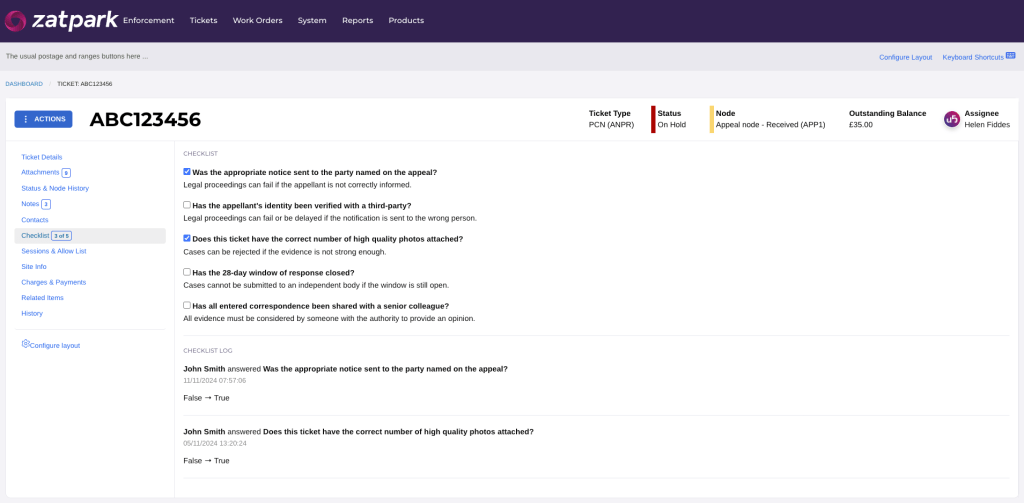
Quality Assurance Checklists
Utilise customisable questions and checklists to ensure all processes are followed correctly.
Other User Visibility:
See which other users are viewing the same ticket at the same time, which prevents duplication of work while improving teamwork and communication.
Additional Time-Saving Features
- Session Timeline: A visual timeline compares session duration against the total duration of stay, making it easier to spot discrepancies.
- Task Management: Assign, create, and link tasks directly to tickets. You can also drill down to see all tasks associated with a case.
- On-Demand Letters: Create and send templated letters at any point in the ticket process.
- Inline Editing: Edit ticket details and custom fields directly without the need for extra clicks to save your changes.
- Clearer History: Easily view a comprehensive history of all transactions, edits, and updates against a ticket.
- Customisable Layouts: Reorder and prioritise important sections of information to suit your workflow.
- Quick Document Access: Access site documents and add them as evidence during appeals and challenges.
- Contravention History: View both historic and active contraventions, including the status of each ticket, within a single modal.
- Visual Node History: See a clear, visual history of nodes.
- Associated Sessions: Link and display related ANPR sessions on the ticket view to create a complete picture.
- Keyboard Shortcuts: Allows navigation around the ticket view using keyboard shortcuts.
This new view is built to give you maximum control and efficiency, fundamentally transforming how your team manages tickets. We are confident the changes will make your operations smarter and more streamlined.
Please note that these features are not being released all at once. They are being gradually released.

Marketing Assistant